
Technical Blueprint
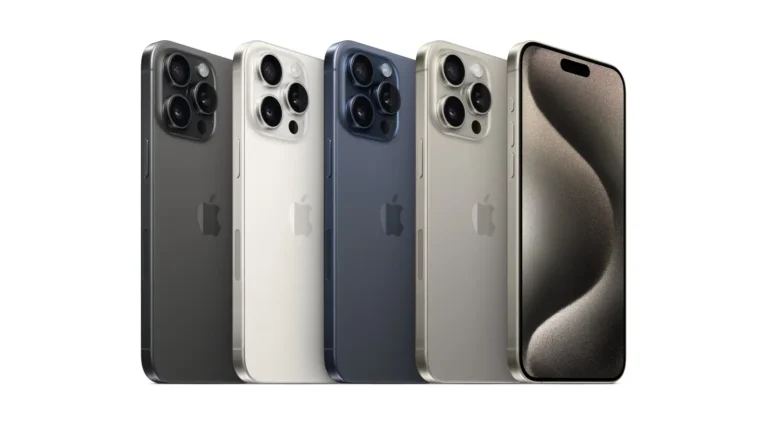
Because the supplied target is All Devices, this guide covers iPhone models broadly, while using the current iPhone 17 as the 2026 hardware reference for Qatar. Apple currently lists iPhone 17, iPhone 17 Pro, iPhone Air, iPhone 17e and iPhone 16 among the iPhone models available in Qatar.
| Technical Area | iPhone 17 Reference |
|---|---|
| Chipset | Apple A19 |
| Process | Third generation 3nm |
| CPU | 6 core CPU, 2 performance + 4 efficiency cores |
| GPU | 5 core GPU with Neural Accelerators |
| Neural Engine | 16 core |
| Main Camera | 48MP Fusion, 26mm, f/1.6, sensor shift OIS |
| Telephoto | 12MP optical quality 2x using main sensor |
| Ultra Wide | 48MP Fusion, 13mm, f/2.2, 120 degree field of view |
| Front Camera | 18MP Center Stage, f/1.9, autofocus |
| Video | Up to 4K Dolby Vision at 60fps |
| Display | 6.3 inch Super Retina XDR OLED |
| Resolution | 2622 x 1206, 460ppi |
| Refresh Rate | ProMotion up to 120Hz |
| Outdoor Brightness | Up to 3,000 nits peak |
| Protection | Ceramic Shield 2 front |
| Water Resistance | IP68 |
| Storage | 256GB, 512GB |
| Charging | Up to 50% in 20 minutes with 40W adapter or higher |
| Wireless Charging | MagSafe and Qi2 up to 25W |
| Cellular | 5G, 4G LTE |
| Wireless | Wi-Fi 7, Bluetooth 6 |
| SIM | Dual eSIM on the iPhone 17 model specified by Apple |
Apple confirms the A19 uses third generation 3nm technology, while the iPhone 17 camera system combines a 48MP main camera with a 48MP ultra wide camera.
Current Qatar status: iPhone 17 is officially available through Apple’s Qatar retail channel and local resellers. Jarir currently lists the 256GB model at QAR 3,199 and the 512GB model at QAR 3,899, while Al Anees currently lists the 256GB version at QAR 3,099. Retail prices can change with promotions and stock.
Unboxing, Build Quality & Ergonomics
The iPhone 17 uses an aluminum design with a Ceramic Shield 2 front and a color-infused glass back. Apple rates it IP68 for dust and water resistance, with testing up to 6 meters for 30 minutes under IEC 60529.
The standard iPhone 17 weighs 177 grams and measures 7.95mm thick. That makes it considerably easier to handle for long periods than larger Pro Max models, especially when using navigation, WhatsApp, photography or business applications throughout the day.
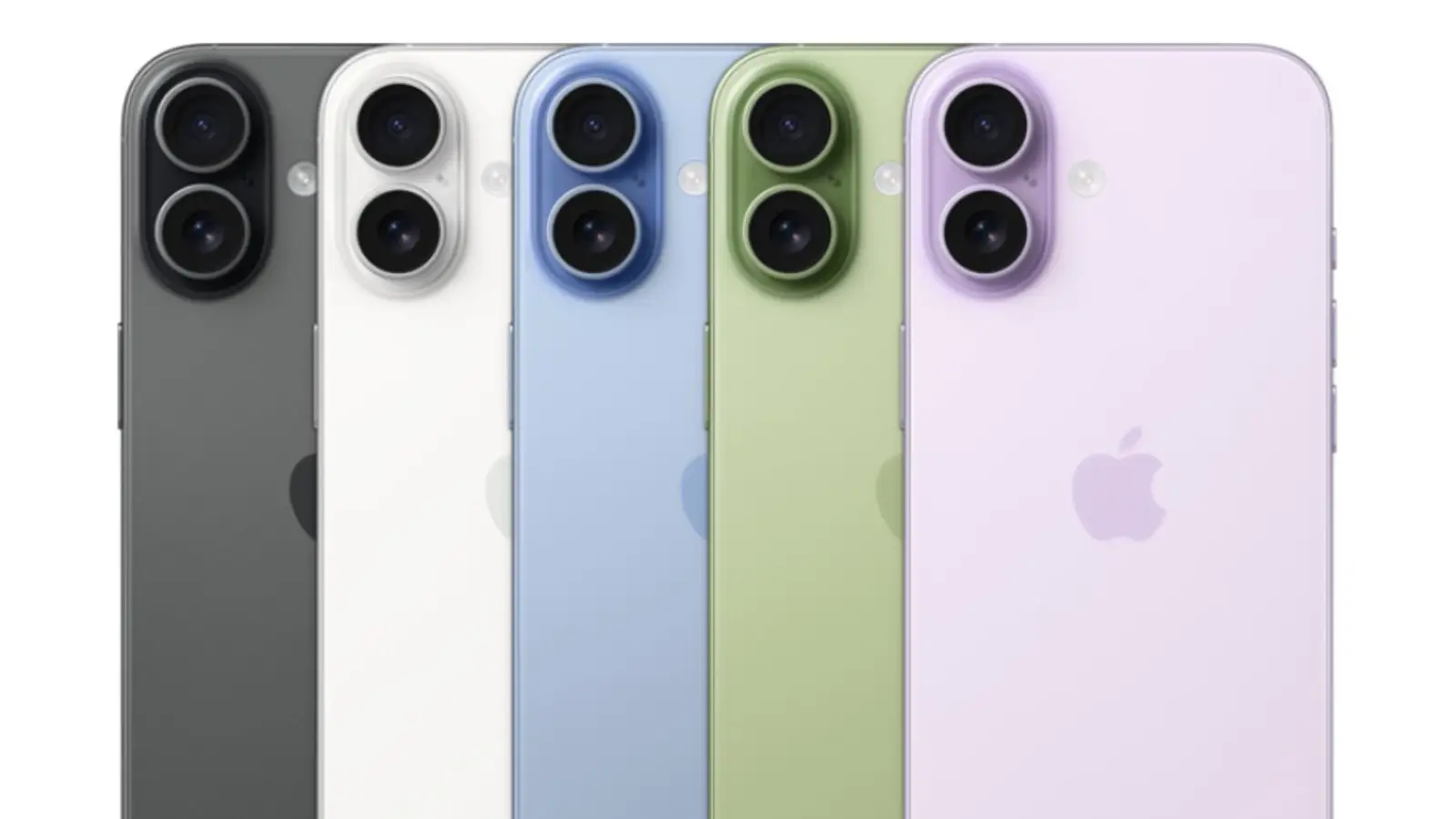
Available colors include Black, White, Mist Blue, Sage and Lavender. Local Qatar availability can differ between retailers, so buyers should confirm the exact color and storage configuration before visiting a store.
For Qatar buyers, the bigger issue is not simply physical durability. A phone used outdoors around Doha can spend considerable time exposed to heat, dust and direct sunlight. IP68 helps against water and dust exposure, but it doesn’t make the phone immune to extreme temperatures.
Display & Visual Performance Under Sunlight
The iPhone 17 has a 6.3 inch Super Retina XDR OLED display with 2622 x 1206 resolution, 460ppi and ProMotion adaptive refresh up to 120Hz. It also supports HDR, True Tone, P3 wide color and Always-On display functionality.
The headline feature for Qatar users is outdoor brightness. Apple specifies up to 3,000 nits peak outdoor brightness, along with an anti-reflective coating.
That matters when checking maps outside Villaggio, walking around Souq Waqif, taking photos along the Corniche or reading a message in strong afternoon sunlight.
In temperatures approaching 45°C or higher, however, brightness and performance can be affected by thermal protection. A high brightness rating should not be interpreted as a guarantee that the phone will maintain maximum brightness indefinitely in extreme heat.
The 120Hz ProMotion system is also useful beyond gaming. Scrolling through Safari, social media, email and long WhatsApp conversations feels noticeably more responsive than a conventional 60Hz panel.
Hardware Power, Gaming & Thermal Performance
The A19 gives the iPhone 17 a high level of CPU and GPU performance. Apple specifies a six-core CPU, five-core GPU with Neural Accelerators and a 16-core Neural Engine.
For normal Qatar usage, this is more performance than most users need. WhatsApp, Microsoft 365, Google Maps, banking applications, social networks, photography and video editing all fall comfortably within its intended workload.
Gaming is a different story. Titles with demanding graphics can push the processor and GPU harder, especially when the display operates at higher refresh rates.
Heat becomes important during long gaming sessions in a hot environment. A phone that performs extremely well in an air-conditioned room may behave differently when used outdoors or inside a parked vehicle. Users should avoid gaming or charging the phone under direct sunlight.
Ooredoo Qatar and Vodafone Qatar 5G
The iPhone 17 supports 5G with 4×4 MIMO and a wide range of sub-6GHz bands. Apple also specifies Wi-Fi 7 and Bluetooth 6.
For Ooredoo Qatar and Vodafone Qatar customers, actual 5G speed depends on location, network congestion, spectrum, plan, signal quality and carrier configuration. The phone’s 5G capability alone doesn’t guarantee a particular download speed.
When buying an imported iPhone, check the exact model number and regional cellular configuration before paying. This is particularly important for users who depend on 5G and eSIM.
Camera Matrix: Real-World Photography
The standard iPhone 17 uses a 48MP Dual Fusion camera system.
The main camera has a 48MP sensor, 26mm equivalent focal length, f/1.6 aperture and sensor-shift optical image stabilization. The system also provides optical-quality 2x telephoto output.
The 48MP ultra wide camera uses a 13mm equivalent focal length, f/2.2 aperture and 120 degree field of view. It also supports 48MP high-resolution photography and macro photography.
For daytime Qatar photography, the main camera is the lens most users should rely on. It provides strong detail and stabilization without requiring a dedicated telephoto camera.
The ultra wide camera is more useful for architecture, group photographs, interiors and large scenes. It also makes sense for places where stepping backward isn’t practical.
At night, Apple’s Photonic Engine, Deep Fusion, Smart HDR 5 and Night mode work together to process difficult scenes.
Video recording is another strength. The iPhone 17 can record 4K Dolby Vision at up to 60fps, with sensor-shift stabilization on the main camera and Cinematic stabilization.
The 18MP Center Stage front camera is particularly useful for video calls and group selfies. Apple also supports 4K Dolby Vision recording from the front camera.
Battery Longevity & Charging Speeds
Apple rates iPhone 17 for up to 30 hours of video playback and up to 27 hours of streamed video playback.
Real battery life depends heavily on brightness, 5G usage, gaming, camera use, navigation and background activity. A user spending hours on mobile 5G while navigating Doha and recording video will consume significantly more power than someone primarily connected to Wi-Fi.
Fast charging can reach 50% in approximately 20 minutes when using a 40W adapter or higher with a USB-C cable. MagSafe can reach 50% in around 30 minutes with a 30W adapter or higher.
Apple does not provide a conventional battery capacity figure on its public technical specification page, so quoting an unofficial mAh number as an official specification would be misleading.
For Qatar, remember that the local household standard is the UK-style Type G three-pin plug. Imported phones may be supplied with different charger configurations, so check the box contents and use a compatible certified USB-C power adapter.
How to Clear Cache on iPhone
There isn’t one universal Clear Cache button for every iPhone app. Safari has a direct method, while individual third-party apps handle stored data differently.
Clear Safari cache
On current iOS versions:
- Open Settings.
- Tap Apps.
- Select Safari.
- Tap Clear History and Website Data.
- Select the required timeframe.
- Tap Clear History.
Apple says this removes browsing history, cookies and website data.
If you want to keep Safari history while clearing some website data, use the website data controls available under Safari settings.
Clear cache for a third-party app
If an app is consuming too much storage:
- Open Settings.
- Tap General.
- Tap iPhone Storage.
- Select the application.
- Check its storage usage.
- Use Offload App or delete and reinstall the app when appropriate.
Be careful before deleting an app. Some applications store locally saved files or downloads that may not be recoverable unless synchronized with an account.
How to Hide Apps on iPhone
On supported iOS versions, Apple lets users lock or hide downloaded apps using Face ID, Touch ID or the passcode.
To hide an app:
- Find the app on the Home Screen.
- Touch and hold its icon.
- Tap Require Face ID, Require Touch ID or Require Passcode.
- Select Hide and Require Face ID.
- Authenticate.
- Tap Hide App.
The application moves to the Hidden folder in the App Library. Apple notes that apps installed with iOS cannot be hidden in the same way.
To find a hidden application, swipe left through the Home Screen pages until you reach App Library. Open the Hidden folder and authenticate.
This is different from simply removing an app from the Home Screen. Removing an app leaves it accessible through the App Library, while hiding it adds authentication.
How to Screen Record on iPhone
Screen recording is built into iOS and doesn’t require a third-party application.
- Swipe down from the top-right corner to open Control Center.
- If Screen Recording isn’t visible, touch and hold the Control Center background.
- Tap Add a Control.
- Add Screen Recording.
- Tap the recording button.
- Wait for the three-second countdown.
- Perform the activity you want to capture.
- Tap the red recording indicator to stop.
The video is automatically saved in Photos.
How to screen record with your voice
Touch and hold the Screen Recording button in Control Center, turn on Microphone, then start recording.
This is useful for creating tutorials, recording an app demonstration or explaining an iPhone setting to another person.
Some apps can restrict screen recording or captured audio and video. Apple also notes that screen recording cannot be used simultaneously with screen mirroring.
How to Check if an iPhone Is Original
This is especially important when buying a used or imported iPhone in Qatar.
Start with:
Settings > General > About
Check the following:
- Model Name
- Model Number
- Serial Number
- IMEI
- Capacity
- iOS version
- Modem firmware
- Carrier information
Apple confirms that these identifiers can be found under Settings > General > About.
Check the model number
Tap the number beside Model Number to switch between the part number and model number.
Apple also provides model identification information for different iPhone generations.
Check the serial number
Compare the serial number shown on the device with the original packaging and Apple’s official device information where applicable.
Don’t rely on the box alone. A counterfeit or tampered phone can have copied packaging.
Check Parts and Service History
On supported iPhones, go to:
Settings > General > About
Look for Parts and Service History.
If replacement components are listed, investigate them before purchasing a used device. A replacement display or battery doesn’t automatically mean the phone is fake, but the information helps establish the device’s repair history.
Check the IMEI
Dial *#06# or find the IMEI under Settings > General > About.
Compare the IMEI shown by the device with available documentation. For used phones, buyers should also check local regulatory and carrier requirements before completing the purchase.
The safest approach is to combine several checks rather than trusting one serial-number website.
How to Record a Call on iPhone
This needs special attention for Qatar users.
Apple supports built-in call recording on compatible iPhones and software versions in supported regions. However, Apple currently states that call recording is not available in Qatar or Pakistan, among several other countries and regions.
So if you’re using an iPhone in Qatar and don’t see the call recording option, this may be a regional feature restriction rather than a problem with your phone.
Where the feature is available, Apple provides call recording for phone calls and FaceTime audio calls on supported iOS versions. Apple also advises checking regional availability and ensuring the other participant consents to recording.
For Qatar users, don’t assume that changing the iPhone language or buying a foreign-region iPhone will automatically make call recording available. Feature availability can depend on regional settings, software and local rules.
Complete Specifications Matrix
| Key Feature | Official Hardware Specifications |
|---|---|
| Model Reference | Apple iPhone 17 |
| Launch Generation | 2025 |
| Operating System | iOS 26 generation |
| Chipset | Apple A19 |
| CPU | 6-core |
| GPU | 5-core with Neural Accelerators |
| Process | Third generation 3nm |
| Display | 6.3-inch Super Retina XDR OLED |
| Resolution | 2622 x 1206 |
| Pixel Density | 460ppi |
| Refresh Rate | ProMotion up to 120Hz |
| Outdoor Brightness | Up to 3,000 nits |
| Main Camera | 48MP Fusion, f/1.6, OIS |
| Ultra Wide | 48MP Fusion, f/2.2, 120 degrees |
| Optical Zoom | 2x optical-quality telephoto |
| Digital Zoom | Up to 10x |
| Front Camera | 18MP Center Stage, f/1.9 |
| Video | Up to 4K Dolby Vision at 60fps |
| Water Resistance | IP68 |
| Storage | 256GB, 512GB |
| Charging | Up to 50% in 20 minutes with 40W+ adapter |
| MagSafe | Up to 25W |
| Wi-Fi | Wi-Fi 7 |
| Bluetooth | Bluetooth 6 |
| Cellular | 5G, 4G LTE |
| Connector | USB-C |
| SIM | Dual eSIM configuration |
| Weight | 177g |
Specifications are based on Apple’s current technical documentation.
Official iPhone 17 Price in Qatar, 2026 Updates
Retail pricing varies by seller, color, promotion and stock.
| Storage | Qatar Retail Example | Price |
|---|---|---|
| 256GB | Al Anees Qatar | QAR 3,099 |
| 256GB | Jarir Qatar | QAR 3,199 |
| 512GB | Jarir Qatar | QAR 3,899 |
Al Anees currently identifies the iPhone 17 as an authorized reseller product and lists a 256GB model at QAR 3,099. Jarir lists the 256GB model at QAR 3,199 and the 512GB model at QAR 3,899, with a 12-month agent warranty shown on its listings.
For buyers comparing prices, also check current stock and warranty terms at major Qatar retailers such as Jarir, FNAC Qatar, Lulu Hypermarket and Al Anees. Apple states that its Qatar reseller network may carry additional iPhone models beyond those shown directly on Apple’s Qatar buying page.
When buying through marketplace listings, verify:
- Exact storage capacity
- Model number
- IMEI and serial number
- Warranty status
- Regional model
- eSIM compatibility
- Physical condition
- Parts and Service History
- Invoice and seller warranty
Final Verdict: Is It Worth Buying in Qatar?
The iPhone remains one of the easiest smartphone choices for buyers who value long-term software support, reliable cameras, strong video recording and consistent everyday performance.
The iPhone 17 is particularly compelling for users who want a 120Hz OLED display, A19 performance, a strong dual camera system and 5G without moving to the larger Pro Max format. Its 3,000-nit outdoor peak brightness is also well suited to Qatar’s strong sunlight.
For most buyers, 256GB is the sensible starting point. Move to 512GB if you record a lot of 4K video, store large photo libraries or plan to keep the phone for several years.
The biggest Qatar-specific limitation in this guide is call recording. Apple’s current documentation says built-in call recording isn’t available in Qatar, so buyers shouldn’t purchase an iPhone expecting that function to work locally.
For used iPhones, authenticity should take priority over saving a few hundred QAR. Check the model, serial number, IMEI, Parts and Service History and physical condition before handing over payment.
Pros & Cons
| Pros | Cons |
|---|---|
| 6.3-inch 120Hz OLED display with up to 3,000 nits outdoor brightness | Built-in iPhone call recording is currently unavailable in Qatar |
| A19 chip, 48MP main camera and 48MP ultra wide camera provide strong everyday performance | Apple does not publish an official battery capacity figure in mAh |
| Excellent 4K Dolby Vision video, USB-C, Wi-Fi 7 and 5G connectivity | Charger may need to be purchased separately depending on the package and retailer |
Bottom line: For Qatar buyers, the iPhone 17 is a strong all-round choice, but the best purchase depends on storage, current retailer pricing and warranty coverage. For day-to-day iPhone users, knowing how to clear Safari data, hide sensitive apps, record the screen and verify an iPhone’s authenticity can be just as useful as the hardware itself.